
Data archive and deleting a company
The company’s data is yours. You can take it out at any time, and before a company is deleted we always make the same archives.
Taking everything out
Section titled “Taking everything out”Only the owner can take the archives.
- Open Exports. At the top is the Company archive card.
- Press Make the archives. You get two archives, made in the background — it can take from a minute to several minutes when there are many files.
- When a row says Ready, press Download.
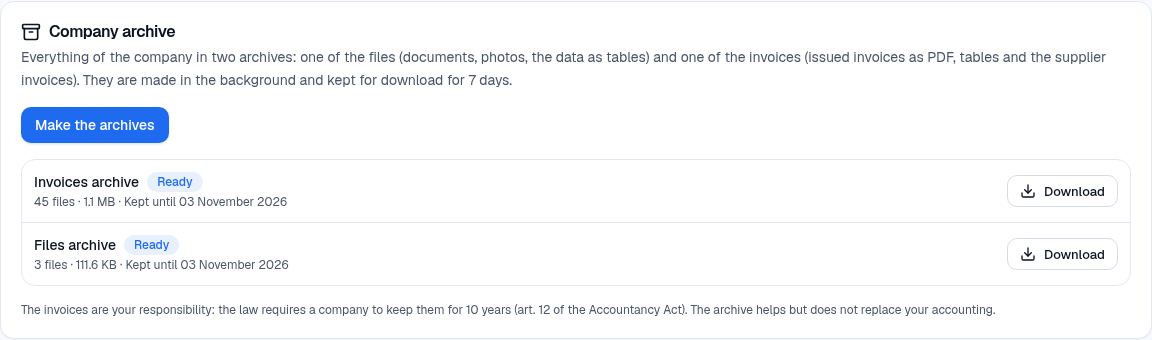
The archives are kept for download for 7 days and then deleted. You can ask up to 3 times a day, one at a time.
What is in the two archives
Section titled “What is in the two archives”| Archive | What it holds |
|---|---|
| Files archive | every uploaded file (documents, photos, registration papers, CMR, course documents), by area; a table of all the company’s data (company-data.xlsx); a list of everything (manifest.csv); a short description (README.txt) |
| Invoices archive | issued invoices, proformas and credit notes as PDF; a table of the invoices, payments and costs; the attached supplier invoices; the list and the description |
If a file is missing in the storage, the row of the archive says so (“N files are missing”) and so does the list.
Deleting a company
Section titled “Deleting a company”When the creator of a company deletes their account, the company with all its data is deleted with it. It does not happen at once: there are 14 days in which everything works and you can cancel from your profile.
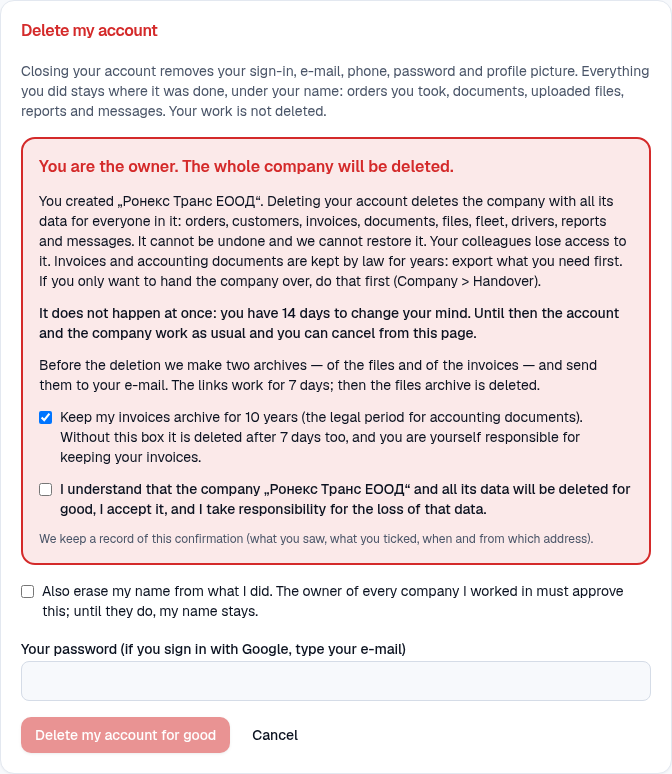
What happens when the time is up:
- Before anything is deleted we make the two archives.
- We send the links to the e-mail of the person who asked for the deletion. They work for 7 days.
- Only then do we delete the company’s data everywhere in Pintle TMS: orders, customers, invoices, fleet, drivers, messages, exchange, routes, GPS positions and uploaded files.
- Copies in our backups disappear within 14 days.
If the archive cannot be made, the company is not deleted — the system tells us first and we fix it.
Invoices and the law
Section titled “Invoices and the law”When you delete the account there is a box “Keep my invoices archive for 10 years”. It is ticked by default.
- With the box — we keep your invoices archive separately, encrypted and available only to you, until the end of the legal period (10 years from 1 January of the year after the newest invoice in it), and then delete it. We use it only to hand it over to you on request: write to us from the company’s e-mail and, once we have checked who is asking, we give you a download link.
- Without the box — the invoices archive is deleted after 7 days too, and you are yourself responsible for having kept it.
Everything else (files, tables, messages) is kept only for the seven days of download.
Frequent questions
Section titled “Frequent questions”Can I take the archive if I am not the owner? No. Only the owner sees the card and can ask for an archive.
The link in the e-mail no longer works. The archive is kept for 7 days. If the company still exists, ask for a new one under Exports. If it is deleted and you left the invoices box ticked, write to us.
What does the platform see? The list of archives (which company, when, whether they are ready). Their content is not opened, except when you ask us to hand it over.