
Quote calculator
Quotes (in the menu, under “Routes”) works out what a transport costs before you promise a price. It is for the owner, transport managers and dispatchers.
How to use it
Section titled “How to use it”- Route. Click the map to put the points (the first is the start, the last the end), or search an address.
- Truck and costs. Choose a truck (optional). The cost fields are filled from the truck (its costs and mileage of the last year), with your figure (kept earlier) or a standard one — shown in orange: there is no data for it and you have to check it.
- Calculate the value. The route is calculated for your truck (size, weight, ADR) and you get the breakdown.
What goes into the sum
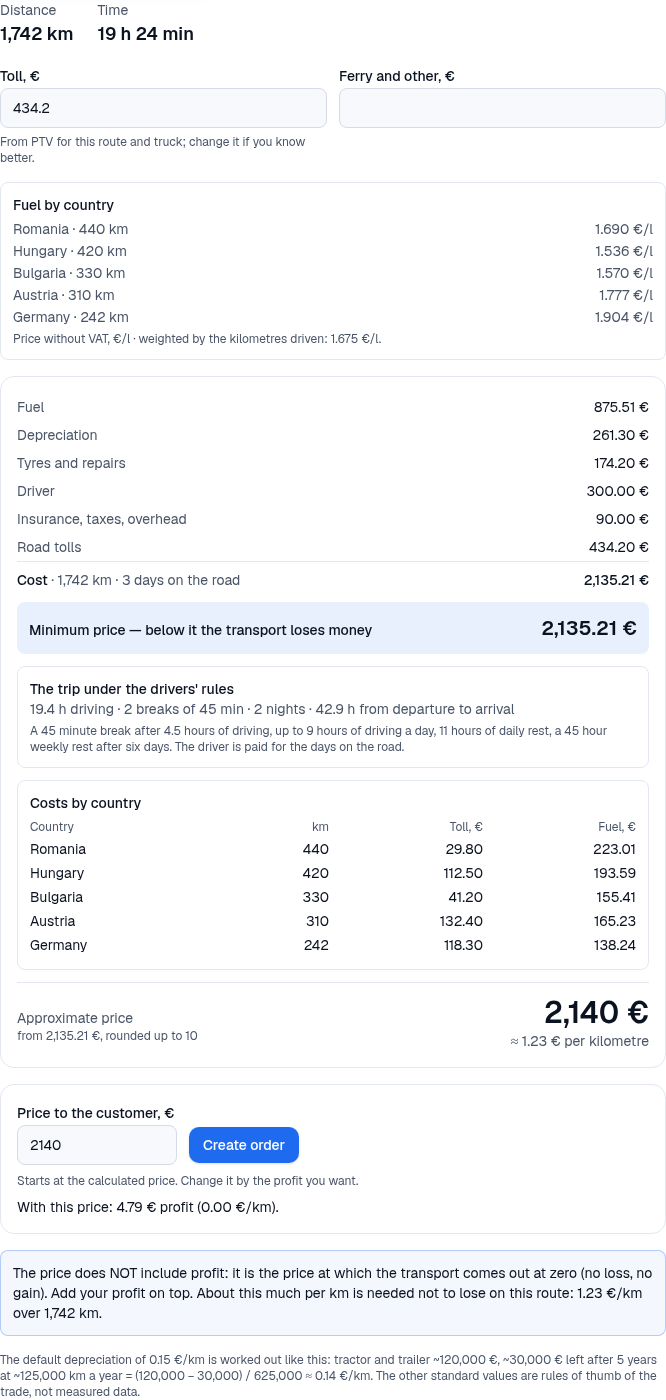
Section titled “What goes into the sum”Fuel, depreciation, tyres and repairs, the driver, insurance and overhead, toll and extra costs (a ferry etc.). Fuel is counted country by country — at the diesel price of each country (the European Commission’s weekly bulletin, without VAT), weighted by the kilometres driven there. Where a country has no price, yours is used.
The toll comes from the router, by country; you can correct it by hand.
The trip under the drivers’ rules
Section titled “The trip under the drivers’ rules”The calculator does not count “9 hours a day” roughly, but the trip under the EU rules for drivers:
- a 45 minute break after 4.5 hours of driving;
- up to 9 hours of driving a day (the value is yours, up to 10 hours);
- 11 hours of daily rest between two days;
- a 45 hour weekly rest after six days.
It shows how many breaks and nights there are, how many hours the whole trip takes from departure to arrival and how many days on the road the driver and the overhead are charged for.
Minimum price
Section titled “Minimum price”The row Minimum price — below it the transport loses money is the price at which you neither lose nor gain. Below it you lose. You add your profit yourself in Price to the client: you see at once what the profit or loss is, in € and per kilometre.
The option Return empty adds the way back to the sum when the truck returns without a load.
Costs by country
Section titled “Costs by country”The table shows, for each country, the kilometres driven, the toll and the fuel. So you see where the money goes.
Keeping and the order
Section titled “Keeping and the order”Keep as my figures keeps your numbers for next time (they are loaded instead of the standard ones). Create order carries the route and the price into a new order.