
Course documents
Every course has its own documents. Most often these are the CMR, T1, T2 and the delivery note, and also photos.
Uploading
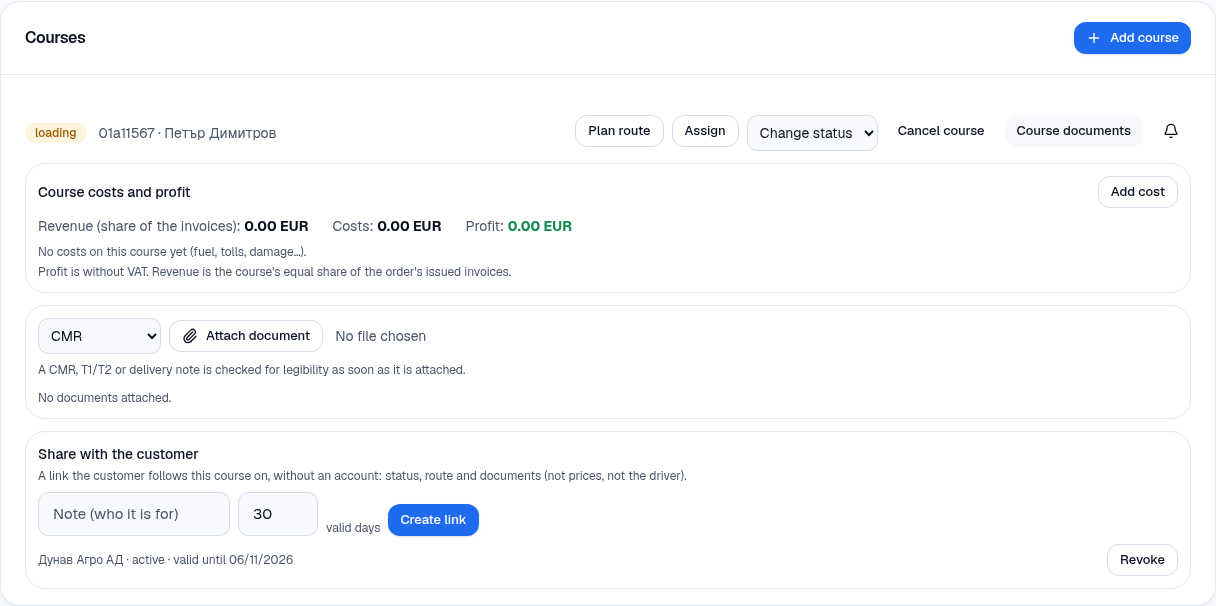
Section titled “Uploading”- Open the course (the order’s page → the course → Course documents).
- Choose the kind: CMR, T1, T2, Delivery note or another.
- Press Attach document and choose a file or a photo. The driver does the same from their phone — with Photograph a document, Choose from the gallery or PDF.
Legibility check
Section titled “Legibility check”A photo of a CMR, T1/T2 or delivery note is checked for legibility straight away after uploading. The system judges whether the text can be read and shows the result next to the document: readable, or a note that something is wrong. This way the driver learns on the spot that the photo is no good and can take it again — and not when the document is already due to be handed over.
Notifications
Section titled “Notifications”The bell next to the course (“Notify me on a new document”) tells you when a document is uploaded to it. Notifications are shown in the bell at the top of the application.
What the driver sees
Section titled “What the driver sees”The driver sees the documents of their own courses only and can upload, but cannot see prices or other people’s data. See Drivers.